Structured Help Request
What It Is
A Structured Help Request is a standardized protocol for communicating technical difficulties to a peer, mentor, or support team. It is a departure from the "reactive" mode of seeking assistance—where a developer or builder simply broadcasts their frustration—and a move toward a "proactive" communication model. At its core, it is about packaging the maximum amount of relevant context into the minimum amount of communication overhead.
In the State Change ecosystem, this isn't just about being polite; it’s about engineering the interaction for speed. It is a recognition that the most expensive part of any technical project isn't the code or the tools; it’s the human time spent trying to understand what someone else meant. This mental model provides a template to bridge the gap between the person who has the problem and the person who has the solution by ensuring they are looking at the same map of the territory.
Why It Matters
When help requests lack structure, they trigger a "ping-pong" effect. You say, "It’s not working." The helper says, "What’s not working?" You say, "The API." The helper says, "What error are you getting?" This back-and-forth can take hours or days, especially in asynchronous environments. Each "ping" requires a context switch for both parties, which is the ultimate productivity killer in high-stakes technical work. Without a structured request, the helper is forced to play detective, guessing at your intentions and your environment, which often leads to "solutions" that don't actually solve your underlying problem.
By adopting a structured approach, you eliminate the guesswork. You provide the helper with everything they need to simulate the problem in their mind—or on their screen—immediately. This transforms the help session from a discovery phase into a resolution phase. It moves the needle from "I'm stuck" to "I'm moving again" in a single interaction. Furthermore, the act of structuring the request often helps you solve the problem yourself. By forcing yourself to define the goal, the error, and the attempts made, you often spot the missing semicolon or the logical gap that was hiding in the fog of your frustration.
How It Works
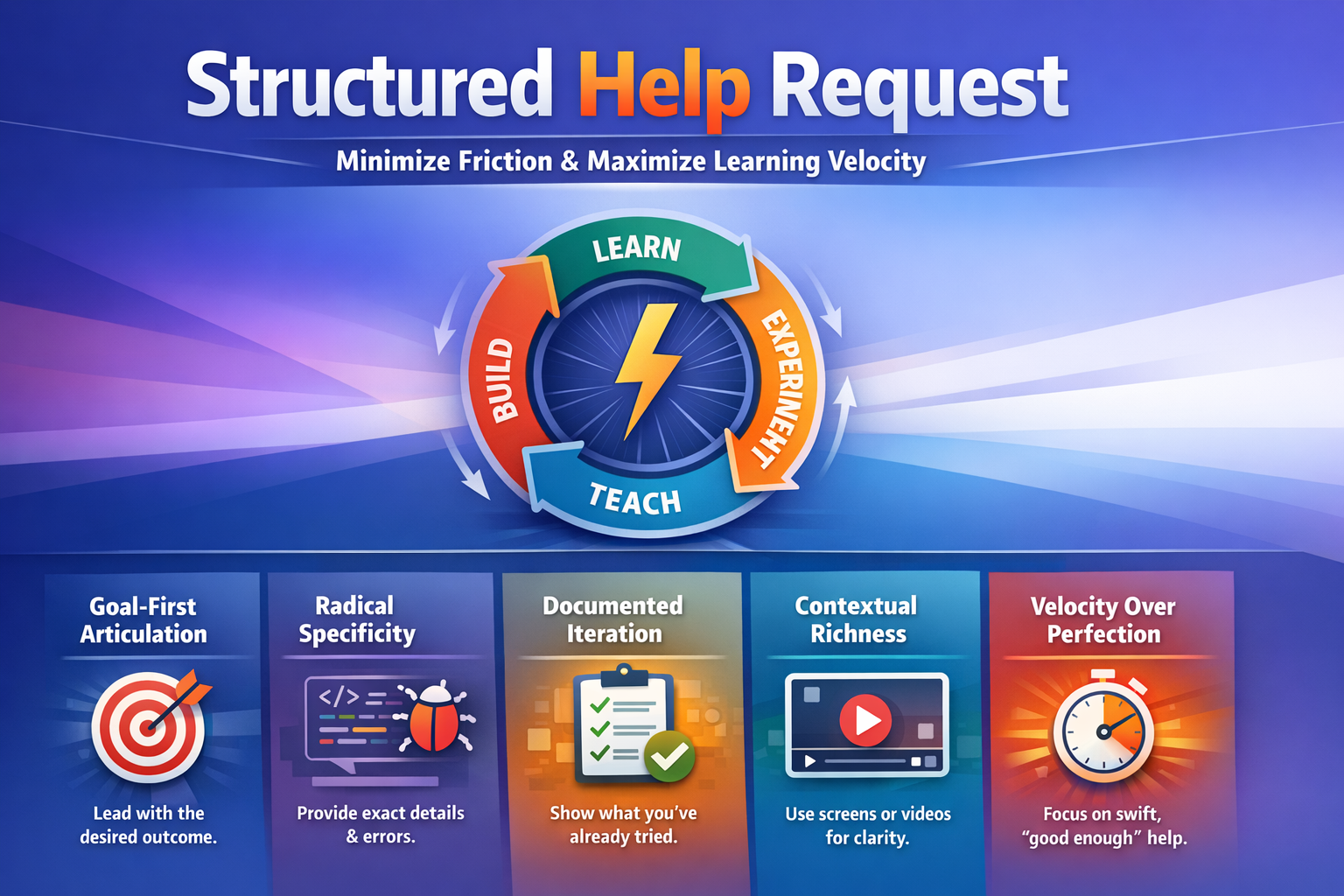
The framework for a Structured Help Request consists of four critical components that must be delivered as a single package.
1. The Goal (The "What")
You must clearly articulate the intended outcome, not just the failure. This prevents the "XY Problem," where you ask for help with a specific step (X) because you think it’s the solution to your real problem (Y). If you only describe the failure of step X, the helper will try to fix X. If you describe goal Y, the helper might tell you that step X is unnecessary or that there’s a much more efficient path to Y. You start here to ensure the helper understands the "why" behind your technical implementation.
2. Specificity (The "Where" and "How")
Vague descriptions like "it didn't work" or "it crashed" are useless in a deterministic system. Specificity means providing the exact data the system gave you. This includes the literal text of error messages, the specific status codes (e.g., 422 Unprocessable Entity vs. 500 Internal Server Error), and a detailed description of what actually happened versus what you expected to happen. If a button didn't trigger a workflow, did it stay blue? Did it turn red? Did the page refresh? These details are the clues that point to the root cause.
3. History of Attempts (The "What I’ve Done")
Documenting what you have already tried is essential for two reasons. First, it prevents the helper from suggesting things you’ve already done, which saves time. Second, it shows the helper your current level of understanding and where your mental model of the system might be flawed. If you say, "I checked the API key and it’s correct," but the error is an authentication error, the helper knows to look at how you are passing that key, not just the key itself.
4. Visual Context (The "Show, Don't Just Tell")
In modern development, especially low-code and no-code environments, a video is worth a thousand lines of text. Using a tool like Loom to record a 60-second clip of you walking through the setup, clicking the button, and showing the resulting error provides the helper with environmental context that is almost impossible to describe in writing. It allows the helper to see the state of your variables, the structure of your database, and the specific configurations of your tools in real-time.
When to Apply
This mental model should be triggered the moment you realize your "productive struggle" has turned into "unproductive spinning." If you have spent more than 15-30 minutes on a single error without making progress, it is time to ask for help—but you must do so using this structure.
It is particularly valuable in:
- Asynchronous Support: In forums, Slack channels, or email threads where you won't get an immediate response. The structure ensures your first message is actionable.
- Complex Integrations: When you are connecting multiple tools (e.g., Airtable to Make to Webflow). The goal is often lost in the technical weeds of the integration.
- Mentorship/Pair Programming: When you are working with someone more senior. Respecting their time means giving them a structured request they can digest in seconds.
Common Traps
One major trap is the "Kitchen Sink" approach, where you provide too much irrelevant information. Specificity does not mean dumping 500 lines of logs; it means providing the relevant logs. The goal is clarity, not volume.
Another trap is skipping the goal. Many technical people feel that the goal is "obvious" (e.g., "I'm trying to sign the user up"). But often, the way you are trying to sign the user up is the problem. If you don't state the goal, you lock the helper into your potentially flawed implementation path.
Finally, there is the "I tried everything" trap. This is a lie we tell ourselves when we are frustrated. You didn't try everything; if you had, it would work. When you say "I tried everything," you provide zero data to the helper. You must list the three specific things you actually tried.
How It Connections
The Structured Help Request is a manifestation of Technical Observability. It is the human version of a log file. Just as a system needs logs to be debugged, a helper needs a structured request to debug your workflow.
It also connects deeply to the concept of Information Asymmetry. You have all the context (what you did, what you saw, what you want), and the helper has none. The Structured Help Request is the bridge designed to equalize that information as quickly as possible. It ensures that the "mental model" of the problem held by the helper matches the "actual state" of the system held by you.
Evidence from Sources
Starting with the Goal
"Start with your goal - Clearly articulate what you want to achieve, not just what isn't working." — How To Ask For Help 1/2024
The Need for Specificity
"Describe the current problem with specificity - Include exact error messages and detailed descriptions of unexpected behavior." — How To Ask For Help 1/2024
The Purpose of the Framework
"Ray Deck outlines a structured approach to asking for help effectively, especially in technical contexts" — How To Ask For Help 1/2024
Contextual Accuracy (Synthesized from Descriptions)
"A structured approach... involves... documenting attempts to solve it, and using video effectively to provide context. This ensures that the person providing assistance can quickly understand the problem and offer relevant solutions." — How To Ask For Help 1/2024
In Practice
Scenario 1: The API Integration
Instead of saying, "My Make.com scenario is failing," a builder says: "My goal is to send a new Stripe customer’s email to an Airtable base. The problem is I'm getting a '422 Unprocessable Entity' error in the Airtable module. I have tried re-mapping the fields and ensuring the email field in Airtable is set to 'Email' type. I've attached a Loom video showing the data coming out of Stripe and the configuration of the Airtable module."
Scenario 2: The UI Bug
A developer is stuck on a layout issue. They don't just say, "The sidebar is broken." They say, "I want the sidebar to stay fixed while the main content scrolls (Goal). Currently, the sidebar scrolls off the screen along with the content (Specific Problem). I have tried setting position: fixed and z-index: 100, but it seems to be ignored. Here is a screenshot of my CSS inspector showing the computed styles."
Scenario 3: The Logic Error
A low-coder is working on a filter. "I'm trying to show only 'Active' projects in my gallery (Goal). Right now, it's showing all projects regardless of status (Specific Problem). I tried using the filter 'Status equals Active' and I tried clearing my browser cache. I’ve included a Loom showing the database records (which clearly show 'Active' and 'Inactive' tags) and the filter settings in the UI builder."
Have questions about Structured Help Request?
Ask the AI Mentor — free, 10 questions/month
Synthesized Essay
Structured Help Request
Category: Practice Related Concepts: XY Problem, Technical Observability, Context Switching, Asymmetric Information.
What It Is
A Structured Help Request is a standardized protocol for communicating technical difficulties to a peer, mentor, or support team. It is a departure from the "reactive" mode of seeking assistance—where a developer or builder simply broadcasts their frustration—and a move toward a "proactive" communication model. At its core, i
This is a preview. State Change members get the full essay, all infographics, audio, and unlimited AI mentoring.
Songs About This Model

Turn the Wheel (The Structured Request)
Upbeat indie rock with a driving drum beat and bright synthesizers

Turn the Wheel (The Structured Request)
Upbeat indie rock with a driving drum beat and bright synthesizers
Core Insight
Specific context turns a cry for help into a solvable technical challenge.
Mindset Shift
From reporting a broken state to providing a structured roadmap for a solution.
Go Deeper
Mental models are just the beginning. Here’s what members get:
Live Office Hours
Ray teaches this model in real time — with your real problems, real code, and real breakthroughs.
Session Vault
1,000+ recorded sessions searchable by topic. Find exactly the moment this model clicks.
AI Skills & MCP Tools
Your AI assistant learns these models too — Skills and MCP servers that bring Ray's thinking to your workflow.
Builder Community
Ask questions, share breakthroughs, get unstuck with 500+ builders who think in models, not just code.