The Three Pillars of Low Code Tool Evaluation
What It Is
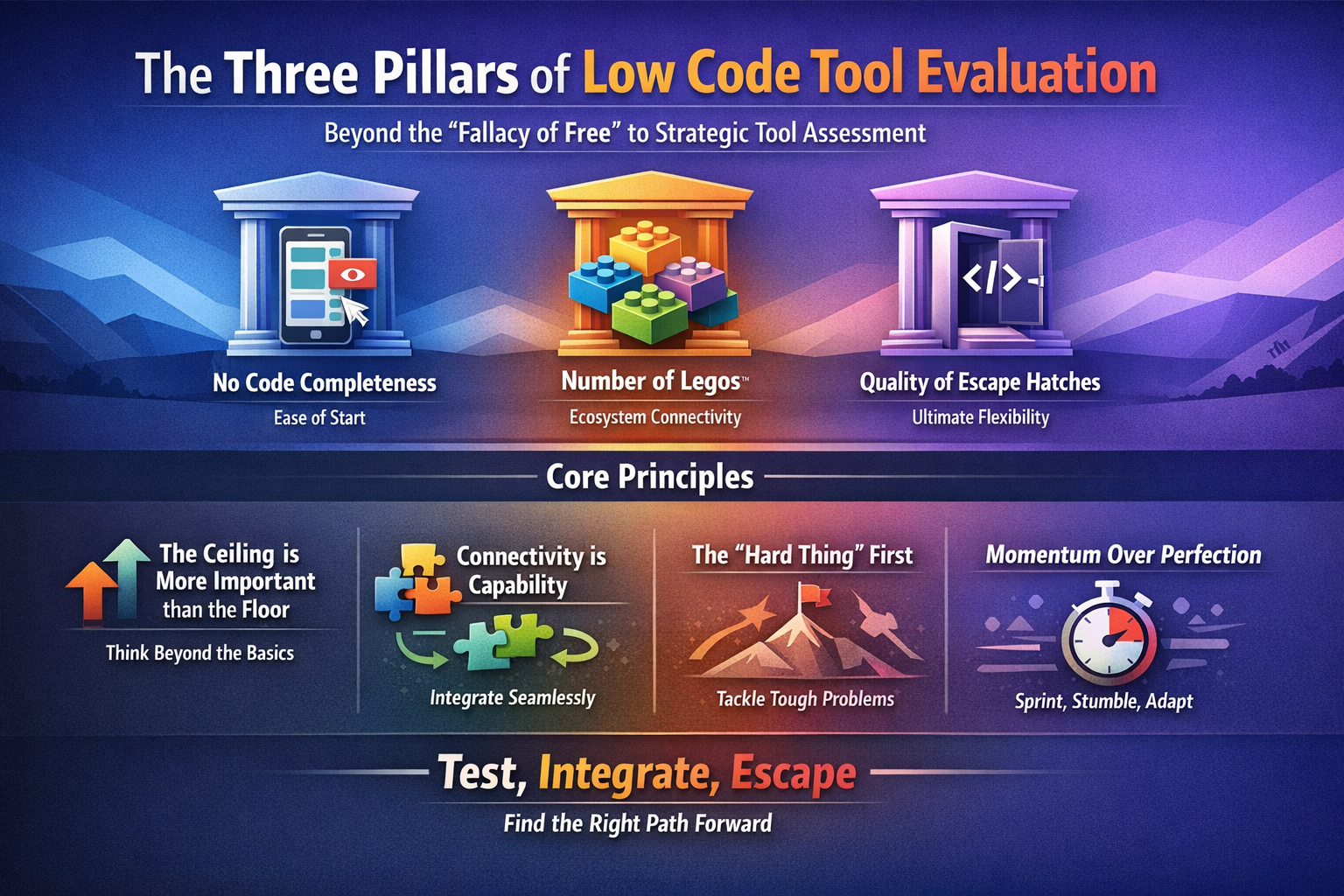
The Three Pillars of Low Code Tool Evaluation is a diagnostic framework designed to move beyond the marketing "hype" of software platforms and into the reality of long-term builds. When you are evaluating a tool—whether it’s a backend-as-a-service like Xano, a frontend builder like FlutterFlow, or an automation engine like Make—you are essentially making a bet on the future of your project. This framework provides the criteria to determine if that bet is safe.
At its core, this mental model breaks a tool’s utility into three distinct dimensions: No-Code Completeness, Lego Density (Integrations), and Escape Hatch Quality. It shifts the conversation from a binary "Can I do this?" to a more nuanced "How easily can I do this, how well does it play with others, and what happens when the tool's native features fail me?" It is a rubric for professional builders who recognize that the "honeymoon phase" of a new tool always ends when the first complex requirement arrives.
Why It Matters
Without a structured evaluation framework, most developers and founders choose tools based on the "wow factor" of their templates or the simplicity of their initial tutorial. This leads to the "Low Code Wall"—a point six months into development where the tool simply cannot do what the business requires, and there is no way to extend it. At that point, your options are either to compromise your product vision or to engage in a costly, time-consuming migration.
The Three Pillars model solves the "Day 2" problem. It acknowledges that your needs will evolve. By evaluating a tool through these three lenses, you ensure that you aren't just buying a solution for today’s MVP, but investing in a platform that can handle the complexity of a scaling product. It allows you to identify which tools are "toys" and which are "infrastructure." It transforms tool selection from a gut-feeling exercise into a strategic engineering decision, ensuring that you maintain high leverage—the ability to get more done with less effort—throughout the entire lifecycle of the application.
How It Works
The framework operates by scoring a candidate tool across three specific categories. A "great" tool doesn't necessarily need to score a 10/10 in all three, but you must understand the trade-offs you are making.
1. No-Code Completeness
This pillar measures the breadth and depth of the tool’s native, visual interface. It asks: How much can I actually accomplish without writing a single line of code? A tool with high completeness has robust logic builders, sophisticated UI components, and built-in database management. High completeness equals high speed. If you have to drop into code to perform a simple "if/then" statement or to format a date, the tool’s completeness is low. You want a tool that handles the "boring" 80% of software development visually so you can save your brainpower for the unique 20%.
2. Number of "Legos" (Integrations)
The modern web is an ecosystem, not a silo. The "Legos" pillar refers to the quantity and quality of pre-built connections to other services. If you need to connect to Stripe, OpenAI, or a legacy SQL database, does the tool have a "plug-and-play" connector? The density of these Legos determines how well the tool functions as part of a larger stack. A tool with many Legos allows you to build "composite applications," where you are orchestrating specialized services rather than rebuilding them from scratch.
3. Quality of Escape Hatches
This is the most critical pillar for professional developers. Every low-code tool, no matter how complete, has a limit. The "Escape Hatch" is the mechanism provided to bypass the visual interface and write custom code.
- Low-quality escape hatch: You can write a small snippet of JavaScript, but it can't access external libraries, or it's limited to a specific, proprietary sandbox.
- High-quality escape hatch: You can write custom functions, import npm packages, write raw SQL, or even export the entire codebase to host it yourself. The quality of the escape hatch determines the "ceiling" of the tool. If the hatch is good, you never have to fear the "Wall."
When to Apply
This model should be triggered the moment a new tool is introduced to the stack. It is particularly valuable during the Discovery and Prototyping phase. Before committing to a specific architecture, run your top three tool candidates through the Three Pillars.
It is also vital during a Pivot or Feature Expansion. If your business model changes—for example, shifting from a simple directory to a complex marketplace—you should re-evaluate your current tools. Does your current tool have the "Completeness" to handle marketplace logic? Does it have the "Legos" to connect to new payment gateways? If not, does the "Escape Hatch" allow you to build those features manually?
Finally, use this when Auditng Technical Debt. If a team feels "stuck" or "slow," it is often because they are using a tool with low completeness (forcing them to code everything) or poor escape hatches (forcing them to use hacky workarounds).
Common Traps
One major misconception is that "More Code = Better Escape Hatch." This isn't true. An escape hatch that is poorly documented or that breaks the tool's visual builder is a "trap door," not an escape hatch. A true escape hatch should feel like a seamless extension of the tool, not a desperate hack.
Another trap is the "Integration Illusion." A tool might claim to have "thousands of integrations" via a middleman like Zapier. However, if you have to pay for a third-party service and manage an entirely separate subscription just to get two tools to talk, the "Lego" density of the primary tool is actually lower than advertised. Look for native integrations or a robust, internal API connector.
Finally, do not fall for "Completeness Overkill." You might find a tool that is 100% complete—meaning you never have to code—but if it has zero escape hatches, you are effectively trapped in a "walled garden." If the vendor goes out of business or raises prices, you are stuck. Always prioritize a tool with a solid escape hatch over one that promises you'll "never need to code again."
How It Connects
The Three Pillars model is the "ground floor" of the State Change philosophy. It connects directly to the concept of Technical Debt Mitigation. By choosing tools with high-quality escape hatches, you are effectively buying an insurance policy against future technical debt.
It also informs the Build vs. Buy decision. High "Lego" density makes "buying" (integrating) much more attractive than "building" (custom coding). This model provides the technical criteria to decide if a tool is a "Load-Bearing" component of your stack or just a peripheral utility. In the broader context of building for the "Hard Parts," this framework ensures that you are choosing tools that can actually handle the hard parts when they inevitably arrive.
Evidence from Sources
On No-Code Completeness
"No code completeness: How much can be done without coding" — Nicky Taylor Podcast Interview 11/23
On Integrations (Legos)
"Number of 'Legos': How many integrations/connections available" — Nicky Taylor Podcast Interview 11/23
On Escape Hatches
"Quality of escape hatches: Ability to extend with custom code when needed" — Nicky Taylor Podcast Interview 11/23
In Practice
Scenario 1: The Rapid Prototype (Prioritizing Completeness)
Imagine you are building a simple internal tool for a marketing team to track lead spending. You don't need complex custom algorithms; you need a fast UI and a simple database. In this case, you choose a tool like Glide or Softr. Their No-Code Completeness is very high for this specific use case. You can build the entire app in a weekend. You sacrifice "Escape Hatch" quality because the risk of needing custom C++ or complex JS is low for this project.
Scenario 2: The Data-Heavy Fintech App (Prioritizing Escape Hatches)
You are building a specialized dashboard that requires custom financial calculations that aren't available in standard spreadsheet formulas. You evaluate a tool like Retool. While its "Completeness" might be lower (you have to understand some SQL and JS to get started), its Escape Hatch Quality is elite. You can write custom JavaScript transformers, import libraries for complex math, and connect directly to any database. You choose Retool because the "Hard Part" of your app lives in the logic that a visual builder can't handle.
Scenario 3: The Orchestration Layer (Prioritizing Legos)
You are building an AI-powered customer support system. Your app needs to talk to Zendesk, OpenAI, Slack, and a custom Postgres database. You look at Make (formerly Integromat). Its value isn't in its UI builder (Completeness), but in its massive library of Legos. Because it has pre-built "blocks" for almost every API on the planet, you can stitch together a complex system in hours that would take weeks to code from scratch. The density of its connections is the primary reason for the selection.
Have questions about The Three Pillars of Low Code Tool Evaluation?
Ask the AI Mentor — free, 10 questions/month
Go Deeper
Mental models are just the beginning. Here’s what members get:
Live Office Hours
Ray teaches this model in real time — with your real problems, real code, and real breakthroughs.
Session Vault
1,000+ recorded sessions searchable by topic. Find exactly the moment this model clicks.
AI Skills & MCP Tools
Your AI assistant learns these models too — Skills and MCP servers that bring Ray's thinking to your workflow.
Builder Community
Ask questions, share breakthroughs, get unstuck with 500+ builders who think in models, not just code.